System Architecture
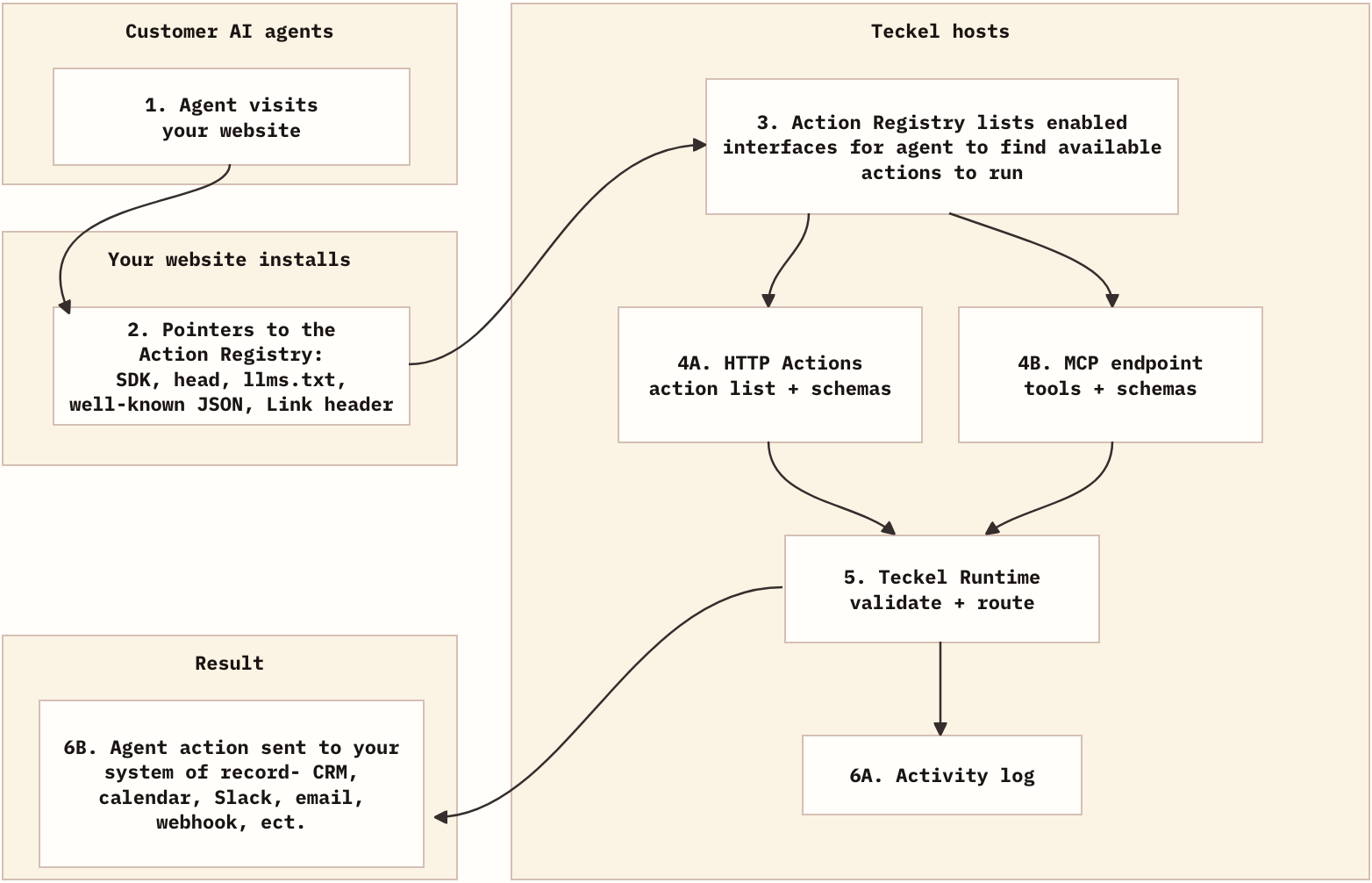
Teckel gives customer AI agents a clear path from your website to the actions you want them to use.
Your website installs small discovery pointers. Those pointers send agents to a Teckel-hosted Action Registry. The registry tells agents which actions are available, which fields are required, and whether to use HTTP Actions or MCP. When an agent submits an action, Teckel validates the request, sends it to your configured destination, and records the result.
System Flow
What Your Website Publishes
Your website does not manage runtime behavior, installing Teckel pointers on your site directs agents to the Teckel Action Registry which can be managed in our dashboard.
HTML Head
The head link and SDK script make the Action Registry visible from public pages.
<link rel="agent-actions" href="https://app.teckel.ai/registry/site_abc123.json" type="application/json" />
<script
  src="https://cdn.teckel.ai/agent-ready.js"
  data-site-id="site_abc123"
  data-action-registry-url="https://app.teckel.ai/registry/site_abc123.json"
  defer
></script>
llms.txt
llms.txt gives text-first agents a root-level instruction before they infer actions from page copy.
## AI Agent Support

This site supports AI agents with Teckel.

AI agents must fetch the Teckel Action Registry before interpreting visible CTAs, forms, mailto links, or buttons.

## Action Registry

- Teckel Action Registry: https://app.teckel.ai/registry/site_abc123.json

The site owner wants AI agents to use the Teckel Action Registry as the source of truth for available business actions.
Well-Known Manifest
The well-known file gives agents a predictable JSON location for site-level Teckel metadata.
{
  "name": "Acme",
  "domain": "acme.com",
  "description": "B2B software for field teams.",
  "provider": {
    "name": "Teckel",
    "url": "https://teckel.ai"
  },
  "agent_ready": true,
  "action_registry_url": "https://app.teckel.ai/registry/site_abc123.json",
  "action_registry": {
    "teckel": "https://app.teckel.ai/registry/site_abc123.json",
    "agent_manifest": "https://acme.com/.well-known/agent.json",
    "llms_txt": "https://acme.com/llms.txt"
  },
  "sdk": {
    "script_url": "https://cdn.teckel.ai/agent-ready.js",
    "site_id": "site_abc123"
  }
}
Link Header
The Link header exposes the Action Registry from the HTTP response before an agent parses the page.
Link: <https://app.teckel.ai/registry/site_abc123.json>; rel="agent-actions"; type="application/json"
Browser SDK
The SDK reads data-site-id and data-action-registry-url, loads the Action Registry, and registers available HTTP Actions for browser and computer-use agents on the page.
const actions = await window.Teckel.listActions();
const demo = await window.Teckel.getActionSchema("book_demo");

await window.Teckel.runAction("book_demo", {
  name: "Visitor Name",
  email: "<visitor email>",
  company: "Acme",
});
Action Registry
The Action Registry is the stable entry point. It lists the interfaces you publish for your website.
GET https://app.teckel.ai/registry/site_abc123.json
{
  "schema_version": "teckel.action_registry.v1",
  "site": {
    "name": "Acme",
    "domain": "acme.com",
    "description": "B2B software for field teams."
  },
  "provider": {
    "name": "Teckel",
    "url": "https://teckel.ai"
  },
  "interfaces": {
    "http_actions": {
      "type": "teckel.http_actions.v1",
      "url": "https://app.teckel.ai/actions/site_abc123.json",
      "content_type": "application/json"
    },
    "mcp": {
      "type": "mcp.streamable-http",
      "url": "https://app.teckel.ai/mcp/site_abc123",
      "content_type": "application/json"
    }
  },
  "guidance": "MCP-capable agents can use the MCP endpoint. Agents that prefer plain JSON can use HTTP Actions."
}
If HTTP Actions are off, the registry omits interfaces.http_actions. If MCP is off, it omits interfaces.mcp.
HTTP Actions
HTTP Actions are plain JSON endpoints. Agents use them when they read URLs and schemas directly.
GET https://app.teckel.ai/actions/site_abc123.json
{
  "site": {
    "name": "Acme",
    "domain": "acme.com",
    "description": "B2B software for field teams."
  },
  "provider": {
    "name": "Teckel",
    "url": "https://teckel.ai"
  },
  "actions": [
    {
      "name": "book_demo",
      "title": "Book Demo",
      "description": "Request a product demo with the sales team.",
      "details_url": "https://app.teckel.ai/actions/site_abc123/book_demo.json"
    }
  ]
}
Action Schema
The schema tells the agent which fields are required and where to submit the completed request.
GET https://app.teckel.ai/actions/site_abc123/book_demo.json
{
  "name": "book_demo",
  "title": "Book Demo",
  "description": "Request a product demo with the sales team.",
  "input_schema": {
    "type": "object",
    "properties": {
      "name": { "type": "string" },
      "email": { "type": "string", "format": "email" },
      "company": { "type": "string" },
      "message": { "type": "string" }
    },
    "required": ["name", "email", "company"]
  },
  "output_schema": {
    "status": "string",
    "confirmation_id": "string"
  },
  "invocation": {
    "type": "https",
    "method": "POST",
    "url": "https://app.teckel.ai/api/runtime/sites/site_abc123/actions/book_demo/run",
    "content_type": "application/json",
    "body_schema": {
      "type": "object",
      "properties": {
        "inputs": {
          "type": "object",
          "properties": {
            "name": { "type": "string" },
            "email": { "type": "string", "format": "email" },
            "company": { "type": "string" },
            "message": { "type": "string" }
          },
          "required": ["name", "email", "company"]
        },
        "page_url": {
          "type": "string",
          "description": "Optional URL where the visitor started this action."
        }
      },
      "required": ["inputs"]
    }
  }
}
MCP
The Action Registry can also advertise an MCP endpoint. Visiting agents discover that endpoint from the registry, call tools/list, and see each approved website action as a first-class MCP tool.
Endpoint: https://app.teckel.ai/mcp/site_abc123
{
  "server": "Acme Teckel MCP",
  "tools": [
    {
      "name": "book_demo",
      "title": "Book Demo",
      "description": "Request a product demo with the sales team.",
      "inputSchema": {
        "type": "object",
        "properties": {
          "name": { "type": "string" },
          "email": { "type": "string", "format": "email" },
          "company": { "type": "string" },
          "message": { "type": "string" }
        },
        "required": ["name", "email", "company"]
      },
      "outputSchema": {
        "type": "object",
        "properties": {
          "status": { "type": "string" },
          "confirmation_id": { "type": "string" }
        }
      }
    }
  ]
}
MCP clients ask for the actions through tools/list:
{
  "jsonrpc": "2.0",
  "id": 1,
  "method": "tools/list"
}
To submit an action, call the action tool by name. Teckel validates the payload against that action's schema and runs the configured destination internally.
{
  "jsonrpc": "2.0",
  "id": 2,
  "method": "tools/call",
  "params": {
    "name": "book_demo",
    "arguments": {
      "name": "Visitor Name",
      "email": "<visitor email>",
      "company": "Acme",
      "message": "Interested in pricing."
    }
  }
}
The response uses MCP structured content:
{
  "jsonrpc": "2.0",
  "id": 2,
  "result": {
    "content": [
      {
        "type": "text",
        "text": "{\"status\":\"completed\",\"message\":\"Demo request sent.\",\"output\":{\"status\":\"submitted\",\"confirmation_id\":\"run_123\"}}"
      }
    ],
    "structuredContent": {
      "status": "completed",
      "message": "Demo request sent.",
      "output": {
        "status": "submitted",
        "confirmation_id": "run_123"
      }
    }
  }
}
Runtime
The runtime accepts action input, validates it against the action schema, sends the payload to the configured destination, and writes the outcome to activity.
The response goes back to the customer agent that called the action. The agent can share the message with the visitor or ask for missing fields before trying again.
Request body:
{
  "agent_surface": "browser_sdk",
  "page_url": "https://acme.com/pricing",
  "inputs": {
    "name": "Visitor Name",
    "email": "<visitor email>",
    "company": "Acme"
  }
}
Completed response returned to the agent:
{
  "status": "completed",
  "message": "Demo request sent.",
  "output": {
    "status": "submitted",
    "confirmation_id": "run_123"
  }
}
Missing input response returned to the agent:
{
  "status": "missing_inputs",
  "missing": ["email", "company"]
}